Merry Christmas everyone!, Welcome to a new blog post. I made a Christmas Pixel art for you guys, Think of it as a christmas gift or somethin. Here it is!

Merry Christmas everyone!, Welcome to a new blog post. I made a Christmas Pixel art for you guys, Think of it as a christmas gift or somethin. Here it is!
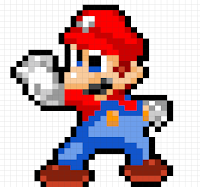
Hi everyone! Today I would like to share with you what I've been doing in maths yesterday. So we had to make a pixel art which I love to do and then we had to find the area and then the perimeter. To find the Perimeter you have to times how many metres from each side, for area you add them up. Here is my 16 bit Mario but here is a challenge if you want it: How much is the Perimeter and how much is the Area? Tell me in the comments. Anyway thanks for reading my blog post. You can comment your answer if you did the challenge or just comment on how my pixel art looks. Have a great day or night and blog ya later!

Hello bloggers! welcome to another blog post. Today I would like to share with you my Among us animation and my pixel art that I am working on because I haven't been working on this either because I'm lazy ooooooorrrrrrrr yeah that's all. My animation is also not finished because I have been working on another animation more often. I talked about blogging this animation in a comment almost 2 months ago! Here is my pixel art which is only half finished.


Before I show you the among us animation. Here are little sneak peeks of pixel arts that were either too hard or I'm lazy once again.


Now what so few people have been waiting for 1 month and 24 days. The among us animation is here. Here, a link or just look at this. Wait before you look at this, here's how this animation works Go in present mode and then hold the right arrow. It looks bad but after a few minutes it looks cool. Now here it is!
The link:Among us Animation
Or just look at this (Look below). Anyway, thank you for reading this blog. If you want you can comment on either my animation or pixel arts. Have a great day or night and blog ya later!
My Matariki DLO
Talofa Lava bloggers, today I would like to share my Matariki DLO. If you don't know what Matariki is. Don't worry, the slideshow will tell you what it is. We have been doing this for reading for almost 2 weeks. We had a bunch of books we read and we made a DLO (A Digital Learning Object) about either 3 questions. 1 was "what is Matariki?" It was the question that I chose. The 2nd question was "How has Matariki evolved since the last century. Finally, the last question was "why do we celebrate Matariki". I chose the 1st question because it pretty much sums up the other 2 questions too. Here is the slideshow if you want.
Hello everyone!, welcome to another blog post. Today I would like to share with you my Olympics profile. Our focus has been on the Olympics since it's started. 1 of our things we had to do was make a profile about an athlete. We could use google slides or Book creator. I chose book creator because I always use google slides to make informational texts. I chose Usain Bolt because he's an easy person to research and I could put a lot of information on it. It's not completely finished but you can look what's been done. The link is right here :Usain Bolt DLO.
I hope you enjoyed this blog post. You could comment on what you thought of my DLO. You don't have to though. Anyway thanks for reading and blog ya later!
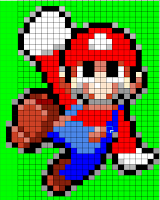
Wassup Bloggers, if you saw my last blog you would see that I made then you would know I blogged about pixel arts. I would like to share them with you again. This time it's only Mario and Luigi in their power ups forms. Tell me in the comments what you would like or what characters I should make. No Mario reference this time. Jeremiah's my name, pixel arts my game (SONIC REFERENCE BOY)
Super Cape feather Mario BD (NOT CANON)


Anyway thank you for looking and reading my blog post. I might blog about an google slide animation or make more of these. Tell me if you want my google slide animation or more of this? If more of this what would you like to see? Have a great day or night and Bye-bye!
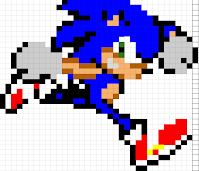
Talofa Lava bloggers, today I would like to share with you pixel arts I have been working on. I was gonna post this on December 14th but I got scared that the teacher would get mad at me and I just forgot about it. About 7 months later here we are! I finally found this, I've made some new 1's so you can say in the comment what you think was better. If you don't know what pixel art is. It's like a grid with a bunch of little squares were you could fill it in with a colour that you want. in the olden days, pixels were actually used to make these things called "sprites" (A thing used to animate) and I decided to make some of these sprites so here we are. These were from the Mario and Sonic franchise because these are my 2 favourite fictional characters. MADE BY ME. MARIO AND SONIC CHARACTERS OWNED BY NINTENDO AND SEGA haha. Man that's very cringy. Lets-A-Go
Also Sonic
.Sonic the Hedgehog (Feel free to say which 1 is better)
(The blue blur) Super Mario
(Mr Video game) :D Also Super Mario
(Say which 1 is better)
The Super Mario Bros (A Classic)

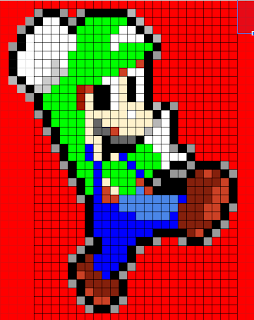 Luigi (The Underestimated 1) LUIGI TIME (You know what to do)
 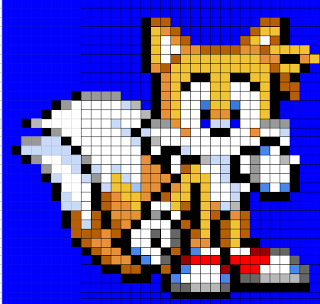 |
Tails The fox (The Sidekick)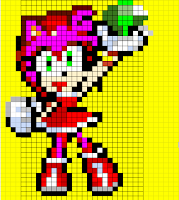 Amy the Hedgehog (The Fangirl)  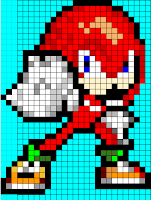 Knuckles the Echidna (The Muscle) 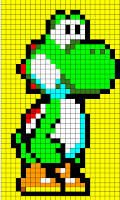 Finally Yoshi :D (Everyone's favourite green Dinosaur) Thank you for reading my blog post, if you want you can comment on what you think of my pixel arts, also you could say which 1 was your favourite. Anyway have a great day or night and See you next time (Mario Reference) |
Procedural writing
Talofa Lava bloggers, welcome to another one of my blog posts. Today I would like to share my procedural work we have been doing. If you don't know what procedure is. It's when you tell someone using a set of instructions how to play a game or build something. But in this case, it was a game. The game I chose was Chess because I knew how to play that game and I was far far behind.
The 1st thing we had to do is a plan on our game which was basically writing snippets of writing like key words or the main parts. If you know how to play Chess, you'd probably guess that you would have to read a lot of words to know all the strategies to do and how to do it. So I left that part out, when we had done our planning. We had to make a google doc and write a full set of instructions on how to play Chess or whatever your game was. A lot of people in my class chose cultural games they have been playing outside. Unfortunately for me, I didn't get to play the games. People had a lot of steps but we also had to add some sort of conclusion on how we've went with the game. I had 5 very long (according to my knowledge) steps. Then I added a conclusion on how good I am at that game (Which is very mediocre). If you don't know how to play Chess and you would like to know how to. Here's a link because it's very long Chess Procedural text
Thank you for reading my blog post. If you want you can comment on if you learned anything from my procedural text. Anyway have a good day or night and blog ya later.
Talofa lava bloggers, Today I will talk to you about our Toolkit's at our School. If your in an Ako Hiko School. You would know we had a Toolkit a few weeks ago. So Mr Riceman (The Tech Teacher kind of) and my Teacher Miss Daly decided to have our own Toolkit at our school. We did it because it was S.T.E.M week. If you don't know what S.T.E.M stands for, it stands for Science,Technology,Engineering and Maths. This time it was with everyone including the Middle school. This was on the date 11/06/21 Or June the 11th 2021 on a Friday. The presenters were the people who went to Toolkits. Which was a total of 24 people. We were sticking with the apps we chose the 1st time. They chose their Toolkits by going through a google form that gave you 3 choices per Toolkit. There were 3 different Toolkits, the presenters got to go to 1 Toolkit each. But the presenter's got put into a random Toolkit. I was presenting google slide animations (which was the best one obviously) with my friend Brayden.
The 1st Toolkit we were presenting, this was gonna go on until our morning tea. We had 18 people attending to our Toolkit. We had a Slideshow explaining what to do, and we showed it with everyone. I had butterflies in my stomach. So me and Brayden started to explain what to do. Then they had to make their own animation. We put on a 15 timer bomb and they started animating. We told them to make a google slideshow. A lot of them needed help. We showed them what to do and over time, they started to become more independent. When the timer stopped, we asked if anyone wanted to share what they have done so far. Most of them did... Except 1. Some of the animations made us laugh and some were very good. My favourite 1 was when a car crashed into a house and the house flew. All credit goes to Anthony for creating that animation. Even me and Brayden got to show another animation we created in the Weekend. My one was about Among us and Brayden's was about Henry Stickman. Paige got to show 2 of her animations she made. They both looked really cool! When the morning tea bell was about to ring. The people from the other Toolkit came in and looked at some of our awesome animations. Ms Sands was in here and took somephotos of us helping people. Here is our slideshow on how to animate.
For our 2nd Toolkit we were presenting once again. This time we only had 11 people attending. This time I was more confident because I had done this before with more people. We showed them what to do and showed them our examples. It was mostly people from the Middle school so we were everyone where. But then I was helping everyone until I started to focus on helping this 1 girl because she really didn't know what she was doing. Brayden was going around helping others, The bomb exploded but we decided to add extra time because these people were a bit more confused then the people from our last Toolkit. We gave them a extra 9 minutes and when it exploded once more. People started sharing their animations, I had 2 favourite animations in this Toolkit. One was when a Basketball didn't go in the hoop but then it bounced on the ground and then it landed. The other was when this guy was running away from a car and then bombs flew from the sky and killed the person. But it suddenly ended when a bell rang.
My 3rd Toolkit was finally not presenting. I was put into Spheros. Cole and Caleb were presenting that Toolkit. They introduced themselves and then gave us examples on how to control Spheros. Then they told us to go on an app called Sphero Edu and click on sign in. Luckily we were already signed in. Then click on connect robot. Then if you have a Sphero, you would see a bunch of random letters and numbers show up and click on 1 of them. Then your one should light up a little time after. We could control our Spheros with WASD or use your mouse to drag it. Since I am a Master (Or so I think I am) at typing so I chose WASD. It worked and it was very cool because I had only done this once but with an Ipad instead. We could do courses or go outside and control your Sphero. I had a buddy and while I was controlling the Sphero. He would run after it and pick it up. I didn't decide to go to do the courses because they looked way too hard. There was this one group who tried to make it up a ramp with their Sphero. In the end they succeeded but it fell (oof).
At the start I was really anxious and scared. While time progressed through the 1st Toolkit, I began to get more confident. During the 2nd Toolkit it was a piece of cake to me because everything wasn't chaos and there were less people which made it better. That's why I liked the 1st Toolkit better because I like action. The last Toolkit was meh because I wasn't presenting which was pretty boring.
Anyway thank you for reading my blog post. If you want you can comment on what you thought about our Toolkit and if you would want to do one if you could. Anyway have an Awesome day or night and blog ya later!
TOOLKITS 2021
Talofa lava bloggers. Today I would like to share with you a very exciting trip about our student led Tool kits on 20/05/2021 (The 20th of May). If you don't know what Toolkits are. It's when the teachers choose a bunch of students to go and learn how to play on sites and apps on your chrome book.
We all traveled by car going to Owairaka School. When we came in most of the Ako-Hiko School students were already there. We sat in our seats and waited till approximately 9:30 Mr Margetts came and welcomed us all and told us what this was about and which classes we were going to. A fun fact is that we were the only Ako-Hiko schools in NZ to do Toolkits. We went on a Ako-Hiko site and I saw my name on "Room 8" Which was coding in Minecraft. The people that were presenting were named Caleb,Sarah and Robel. They told us what to do. They told us to go on their slideshow showing the link to the hour of code game (Here is the link if you want to go the site) Then they said to choose a journey. Each journey is different and unique. I chose the Minecraft designer journey. Where at the end of the journey, I could program my own game. Each Journey has their own intro depending on what the type of scenery the journey is. P.S If you scroll down, you can see that you can play Minecraft education edition (If you are allowed to download it). After the Intro you'll get a tutorial, basically a guide on how to play the journey you picked. After your tutorial if you scroll up it will show you what you will have to do. Then you'll have to code it. For Example my one said "Move the chicken, click on the code ("Move Chicken (the direction)" After that you will have to make it through all of the levels. I'm not really sure what the endings to all of the journey's are but I'll leave that up to you ok?? After that we had a 15 minute break. Sooooo that was basically the 1st subject I did.
The 2nd Subject I did was "How to Animate" Which is what I presented with my buddy Brayden to try to get into Toolkits but we didn't present it... probably because someone was already presenting it. It was in room 23 but I was struggling to find that class until someone finally told me. I couldn't know their names because I was so late. Even though I wasn't there for a long time I'll try to explain the best I can. The 1st thing we did was create a slideshow in your drive. Then you'll create a background using either an screenshot of an image or draw it using lines. After that you'll have to create your characters. You can either create a stick man using lines or use an image again. Then create a new slide move your character slightly to look like it's moving. Maybe you could also make speech bubbles to make it speak. That was a different way to what me and Brayden showed. Then when you think your done you can give it a title! My one was named "Plane Crash" Where it was when a plane crashed and this guy was gonna fly into the air and land in a coffin. But I couldn't get to finish it. After that we had another 15 minute break.

After our next 15 minute break I had to go to room 8 again for my final app I was gonna learn whichwas...... Kahoot!! Kahoot is a quiz game where you can create quizzes for your friends. Or if your a teacher for your students about what you have been learning recently. The people presenting this Toolkits names were Malia,Tina and Mele. If you want to make a Kahoot just type in "Kahoot.com" It will take you to a site and you should click "sign up" and press continue with google when you make it to that place. But the 1st thing we did was play a Kahoot about Matariki. The start of the Maori New year. I learned a lot of things there because I didn't do very good. I still managed to snag 7th place though because none of us really did anyway. Somebody in our school actually came 1st. His name was Martin. They said we could make a kahoot about Movies,Tv show's, games or even your school. I did one about my school. I started of with some easy ones like "do we wear uniform at school?" or "How many years do we stay at our school?" Then when we have finished they would show us all how to play with our friends. Which I already knew because I've done this once at home with my family. We all created Kahoots and obviously I won all of the Kahoot's my siblings made. We did this for about 30 minutes and then we stopped and went back into the hall.
When we came back to the hall Mr Margetts came and talked about a company named fusion. Which was a company that a guy named Tim (The guy who fixes all our chromebooks) worked for. Then 2 brothers came in and told them how they got in fusion. For the most part they just loved technology and then got in an internship in fusion and then got a full-time job there. After that they finished their speech and Mr Margetts came to say thank you and goodbye and that was the day of the Toolkits
Thank you for reading this blog post. If your from an Ako-Hiko School and you went to Toolkits. Comment on what you did for when you went to Toolkits. Have a great day or night and blog ya later!
Ki Ora Everybody, welcome to another one of my blog posts. Today the year 6's went on a trip to a place called Spark Arena. I'm a year 6 but unfortunately I didn't come because I wasn't here all last week to return my notice. The teachers had to go (obviously) So we had our Deputy Principal. Miss M'Grath.
The first thing we did was talk about our well being survey we did last term. But that was kinda not related to what we were doing and plus it was kinda boring. So we'll skip that part, OK? Next Miss M'Grath turned on some music and we had to start walking around. When it stopped. We budded up in pairs and said one thing we were grateful for? She turned it on again we started walking again and you get the point. The people I budded up with were Savanna (My sister), Tehani and Abdullah. One of the things I said was grateful was "I'm grateful that my dad took me to school today".
We finished that and then we started talking about what to do if someone was bullying or being mean to you. Then we started to make fortune tellers that at the end, had nice messages to compliment and Encourage you. Only 2 of us knew how to make it so Ms M'Grath had to show us one step at a time. When we were done, we could show other people the messages we wrote. One of the things I wrote was "Have an Awesome day!" We did that until the morning tea bell rang which I had to ring because one of the year 6's normally would have to ring the bell.
Heres a photo of my fortune teller.

Also a photo of my messages.

Sorry that you can't see it very well D:
If you want to make a fortune teller here are the steps.
1. First you get a square piece of paper or a normal one and then fold it diagonally like this. and do the same thing but with the other corner. If you used a normal piece of paper you can cut th(turn down your brightness to see more clearly)


4.The next thing you gotta do is do the same thing on the other side but fold it with the other side of folded paper too. When you are finished your paper should look the same as the other side.
5. Fold your piece of paper in half and put your thumb and pointing finger in one side and your other thumb and pointing finder in the other sides.
6. Your done! :D Put 4 colors in your first half. Unfold your piece of paper and it should look like the photo on step 4 but with folds in the middle of each folded piece. After that you can either color in using 8 colors or write numbers from 1-8 and then you can write messages inside the 8 folds and then use it for your friends! :D
After morning tea we had SSR (Sustained Silent Reading) and then we got into a circle. It was not an ordinary circle though. It was called a Compliment Circle. Here's how it worked. One person started off saying a compliment. Then the person who got complimented went next. Then the process got repeated until the last person came. The last person Complimented the person who went first. My compliment was to Dustine which was "I liked how high you hit in tennis" Because he did a very high shot in tennis during morning tea.
A little bit later the year 6's came back and they told how fun it was... I wasn't jealous totally not... Anyway thank you for reading my blog post. If you want you can comment something you liked about my Day! Have a great day or night and blog ya later!

Talofa Lava Bloggers. For a few weeks for reading we have been working on a Sea Week slideshow and for one of our work we had to blog one of our piece of work we have been doing. Which is what your looking at right now... Anyway I would like to share with you my info-graphic about Marine Reserves. If you don't know what an info-graphic is. It's basically when you go on a google drawing. (Or any other kind of thing that works for that matter) and give the reader some information about your topic. Add your photo for some proof and back up. We used the facts we gathered during all those articles and work we had done.
If you want here is a photo of the finished product.

(Scroll in to see the facts more clearly)
Things I have learned during this: A lot of things about Marine Reserves, that Snapper fish and Crayfish are actually endangered species. How to pronounce Kina and also what it does to the sea animals. That Marine Reserves aren't fully perfect for sea life (Nothing is Perfect)

Ki Ora everyone. Today I would like to tell you about a poetry challenge by our cyber smart teacher Mr Marggets I think it's spelled. Basically he made a site called poetry slam. Where we share our poems. First we had to make a poem any type. I did my sea poem. Next we had to screen castify our poem with us saying our poem. Then we had to blog our screen castify which is the thing your reading right now. Hope you like it! >
Picasso Portrait Art
Welcome bloggers. Today I would like to talk about our Picasso Portrait. A Picasso is basically when you make somebody's face as least symmetrical as possible like eyes on different parts of the face or your nostril on the top of your nose and bottom of your nose. Or making your eyebrows or lips different sizes. And things like that. We used this as our portraits. I came back to school so I had to start late. I watched a video and I found out how to draw a Picasso. Later on I found out who created it too. His name was Pablo Picasso. I started drawing a weird shape for my face as that was one of the steps to making a Picasso portrait. I drew a top hat on my head for detail I drew the face and went on to colouring. For colouring we had to color different parts of our portraits different and odd colour. After that I had to carefully use permanent marker to go around my portrait. Then we finished.
Fun facts about the creator:
1. Pablo painted his first painting at 9 years old and his first exhibition at 13.
2. His first word was Lapiz, Spanish for pencil
3. He created over 20,000 Artworks during his lifetime
4. He was the first living artist to exhibit the Louvre gallery at the age 90.
If you want you can check out my portrait.

Thank you for reading my blog post. If you want you can comment down below on what you think of my Portrait. Anyway have a great day or night and blog ya later!
Netball
Talofa lava bloggers. Today I would like to tell you about our Netball lesson on Wednesday. We had two Netball teachers named Josina and Olivia. First they told us to play a game of infinite tag. Infinite tag is simple. Everyone is in and you have to try and tag everyone,if you get tagged. You have to sit down, but keep on eye on the person who tagged you. They might get tagged and that's your signal to get back up and keep running.
We played for a few minutes and then we went to do some exercises. The first exercise was high knees. We basically had to put our knees as high as possible. The next exercise was butt kicks. Butt kicks is when you kick your legs to your butt. Then we did Lunges. Lunges are when you step forward and try to bend as far as possible without your knee touching the ground. The next one you all probably know which is sprinting. When you run as fast as possible. After our exercises we sat down and our Netball teachers teached us about dodging. Dodging in netball is simple. When someone has a ball and they're trying to throw it to you but someone is in the way you take one step to either direction and make sure they follow you and then quickly step in the other direction and run.
After that we played a game I don't remember the name of. But the rules were you tuck one bib in your pants and try and get other bibs,when you grab one. Bob down and tuck it into your pants, and they were no goose guarding. We had 2 minutes and whoever had the most won. We played twice and we moved on to another game that was kinda like capture the flag but you had to steal balls instead. The rules are simple. there two halves and two teams. One half belongs to one team and the other team has the other half. When someone from the opposing team steps on your side,you can tag them but when they aren't on your side you can't. The goal is to get a ball from the other side and bring it back without getting tagged. We also played twice and it ended up in a draw. After that we ended our session.
Here is a photo of me and Brayden dodging

Anyways thank you for reading my blog post. I hope you enjoyed reading it. Have a great day or night and blog ya later!
Ki Ora Bloggers Welcome to another blog post. Today I would like to show you my Dot Art, me and my syndicate have been doing.
Our Teachers showed us a sheet with dots that formed a Christmas Tree, then we had to grab a piece of cardboard and a pin. We could choose by three colours. Green, Blue and Yellow. I chose Green because if I chose blue you wouldn't be able to see it very well only unless you put it on a window and also because its my favorite colour. Then after we chose our piece of cardboard. we had to place the piece of cardboard on the mat. Put the Paper on top of it, then use the pin to poke the dots on the sheet so it would make little holes in the cardboard that formed the Christmas Tree. After you finished it. You could use the pin like a pencil to write your name
Here is what it turned out
in the end.

Thank you for reading this blog post. I hope you enjoyed it. If you want you can comment on what you think of this picture. Anyway have a great day or night and blog ya later!